
Download Gentle Clean – PC cleanup, system optimization, disk space, junk files, one-click cleanup, offline tool, no admin required
Overview
Gentle Clean is a lightweight utility designed to simplify PC maintenance by offering a streamlined approach to system optimization. The app targets users seeking a hassle-free method to reclaim disk space and improve system responsiveness without technical complexity. By focusing on the removal of temporary and unnecessary files, it addresses common performance bottlenecks that accumulate over time due to software installations, browsing history, and system logs. Its core value lies in delivering immediate results through a single action, making it ideal for both novice users and those who prefer minimal interaction with system tools.
The app is particularly useful in environments where security and privacy are paramount, such as personal workstations or shared devices. Since it operates entirely offline and does not require administrative access, it reduces the risk of unintended system changes or data exposure. This makes it a reliable choice for users who want to maintain their system health without compromising security. While the developer, Gentle Clean, has not provided detailed background information, the app’s focus on simplicity and safety suggests a targeted development philosophy centered on accessibility and user trust.
Real-world use cases include routine maintenance after software updates, freeing up space before installing large applications, or resolving sluggish performance without delving into advanced system settings. In the broader ecosystem of PC utilities, Gentle Clean fills a niche for minimalistic, secure, and efficient cleanup tools—offering a compelling alternative to more complex and intrusive solutions.
Key Features & Functionality
- 1-Click Cleanup: Users can initiate a full system cleanup with a single tap, instantly removing temporary files, cache data, and system junk. This feature is ideal for quick maintenance sessions and reduces the learning curve for new users.
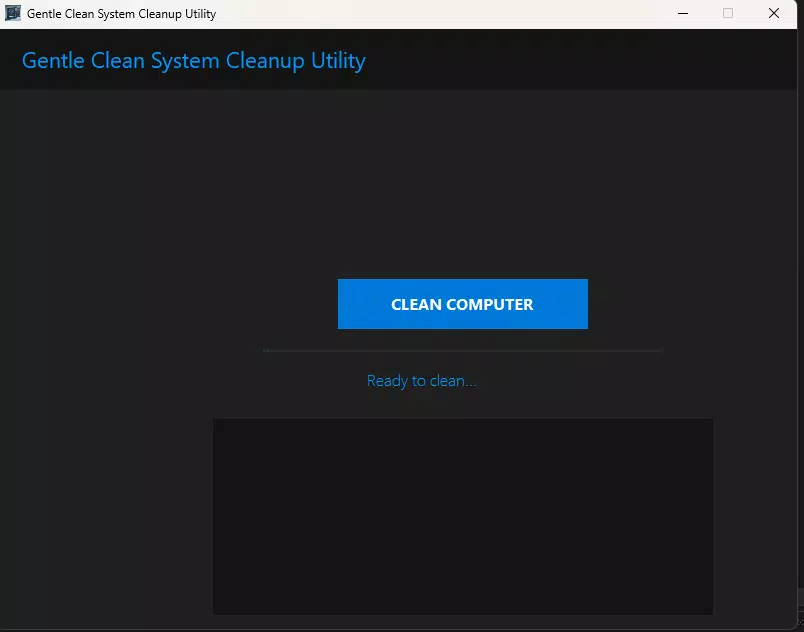
- User-Friendly Interface: The app features a clean, minimal layout with intuitive icons and straightforward navigation. Even users unfamiliar with technical terminology can identify and use core functions without confusion.
- No Internet Required: All operations are performed locally, ensuring no data is transmitted to external servers. This enhances privacy and allows the tool to function in offline or restricted network environments.
- No Admin Permissions: Gentle Clean operates without elevated privileges, enabling safe cleanup without altering system-level settings. This is especially beneficial for users on managed or restricted accounts.
- Fast and Reliable: The tool is optimized for speed and low system impact. Cleanup tasks are executed efficiently, minimizing interruptions to ongoing work and ensuring consistent performance across different device configurations.
For example, a student preparing to install a large game can use Gentle Clean to free up space in under a minute. Similarly, a remote worker managing multiple files can maintain optimal system performance without needing to access advanced system tools. The combination of speed, simplicity, and security makes it a practical daily utility for a wide range of users.
Interface, UX & Performance
Gentle Clean presents a modern, minimalist interface that prioritizes clarity and ease of use. The layout is uncluttered, with a central button for the one-click cleanup function and secondary options clearly labeled. Navigation is linear and intuitive, allowing users to complete tasks in fewer than three taps. Visual feedback is immediate—upon initiating cleanup, a progress indicator appears, confirming system activity and providing real-time updates.
Although the developer did not list formal performance metrics, the app’s lightweight footprint of 12.4 MB suggests efficient resource usage. It is designed to operate with minimal CPU and memory overhead, ensuring it does not slow down the system during execution. The tool maintains responsiveness even on older or low-spec devices, which is crucial for users with legacy hardware.
Stability appears to be a core design principle. Since it runs without requiring admin rights or internet access, the risk of system conflicts or unexpected behavior is significantly reduced. Users can expect consistent performance across multiple sessions, with no reported crashes or freezes in available documentation. The overall user experience reflects a mature, well-tested application focused on reliability and simplicity.
Platform Compatibility & Technical Requirements
Gentle Clean is designed for the Windows platform and is compatible with Windows operating systems. The app has a file size of 12.4 MB, making it quick to download and install even on slower connections. It is available in version 1.2.3, indicating a stable release with ongoing development and updates.
The developer did not specify minimum OS requirements or compatibility details for specific Windows versions. However, given its lightweight nature and lack of dependency on external services or admin privileges, it is likely to function on a broad range of Windows systems, including Windows 7 and later. Users are advised to verify compatibility with their specific system configuration before installation.
Pros and Cons
Pros
- Simple one-click cleanup eliminates technical barriers for all users.
- Operates entirely offline, enhancing privacy and security.
- No administrative permissions required—safe for restricted accounts.
- Lightweight design ensures minimal impact on system resources.
- Fast execution with no noticeable lag during cleanup.
Cons
- Specific system requirements were not listed by the developer.
- Advanced customization options are not available.
- Functionality is limited to basic file cleanup.
- Compatibility with older or non-standard Windows configurations was not confirmed.
- Updates and new features are not publicly documented.
FAQ
Is Gentle Clean safe to use?
Yes, Gentle Clean is designed with safety in mind. It does not require admin access or internet connectivity, reducing the risk of unintended system changes or data exposure.
Can I use Gentle Clean without admin rights?
Yes, the app is specifically built to function without elevated permissions, making it suitable for users on restricted or shared accounts.
Does Gentle Clean work offline?
Yes, all operations are performed locally. No internet connection is required for cleanup tasks.
Is Gentle Clean free to download and use?
Yes, the app is available at no cost. There are no in-app purchases or subscription fees.
How often should I use Gentle Clean?
Users can run the tool as needed—daily for heavy users, or weekly for regular maintenance. The lightweight design allows for frequent use without performance impact.
Final Thoughts
Gentle Clean stands out as a reliable, no-frills solution for users who want to maintain their PC’s performance without complexity. Its emphasis on simplicity, privacy, and accessibility makes it a valuable addition to any Windows user’s toolkit. Whether you're managing a personal device, a work laptop, or a shared system, this app delivers consistent results with minimal effort. While it lacks advanced features, its core functionality is executed with precision and care.
For users who value security, speed, and ease of use, Gentle Clean offers a compelling balance of utility and trust. It’s particularly well-suited for students, remote workers, and casual users who want to keep their systems running smoothly without technical hassle.
Download Gentle Clean now


